Member handbook · Edition 1 · September 2026
Algo Lisa AutoPilot
The complete user guide
An autonomous AI day trader, a real funded brokerage account, and a way for your own account to take the same trades at your own size. This is the whole story, the whole track record, and every step of setup in order.
LiveTradeTalk.com · TplusTwo Holdings, LLC
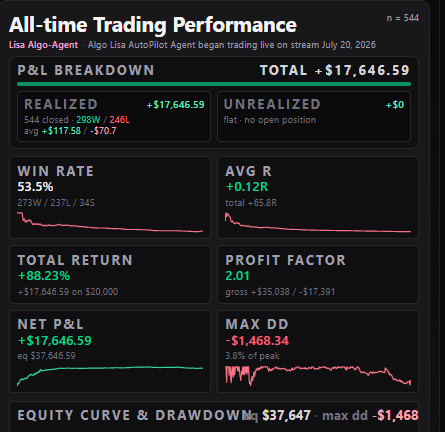
Live results shown are from July 20, 2026 through September 11, 2026.
PROLOGUE
Why a machine ended up trading Steve's playbook
Every trader who has ever kept an honest journal finds the same thing written in it. The rules were fine. The setups were fine. What went wrong was the human — the trade taken early because waiting felt unbearable, the stop widened because being wrong felt worse than losing, the winner cut at half target because the gain felt too good to risk, the revenge trade at 2:15 that turned a small red day into a bad one.
Steve D had spent years teaching a playbook that worked when it was followed exactly. The problem was never the playbook. It was that following it exactly, every session, for six hours straight, is something almost nobody can do. So the question turned around: instead of teaching people to trade like a machine, what if the machine traded the playbook?
That became Algo Lisa. The setups were reverse-engineered out of the playbook into hard rules a computer can test — a trigger, a stop, a target, a size, and the exact condition that says the idea is dead. Each one was replayed across a hundred past market sessions before it was allowed anywhere near real money. Most of them failed and were thrown away. The survivors became her book.
Then she was funded and turned on in public. Not a signal service, not a backtest screenshot — a real brokerage account, printed live all day, every entry and every exit visible while it happens, including the losers. The same discipline built into every setup is also built around the entire book: fixed risk per trade, a step-down rule when losses begin to accumulate, circuit breakers that bench weak conditions, limits on simultaneous positions and a hard daily loss ceiling. Those guardrails keep one trade or one difficult stretch from controlling the account, preserve capital for the next qualified opportunity and have helped turn a tested playbook into the solid live profits shown in the results section that follows.
Members asked the obvious next question: can my account just do what hers does? That is AutoPilot. Lisa takes the trade in her account, your account gets the same trade at your size, and the only two decisions left to you are how big you go and whether you tap Approve or let it route by itself.
The rest of this guide is the how. Read it in order — each section sets up the next, and by section 06 you are doing, not reading.
01
What Algo Lisa AutoPilot is
Algo Lisa is an autonomous AI day-trading agent that trades a real, funded brokerage account in public, every session, from the opening bell to the close. Nothing is hypothetical: every entry, stop, target and exit she takes is posted live on LiveTradeTalk.com while it happens, and every fill is reconciled against the brokerage at the end of the day.
AutoPilot is the membership that lets your own brokerage account mirror her. When Lisa enters a trade, a ticket is generated for you with the symbol, side, entry, stop, target and a share count sized to your account — not hers. You either tap Approve, or you switch on auto-approve and the order routes by itself. The trade is placed inside your own brokerage account, in your name, with your money. We never touch, hold or custody a dollar of it.
She trades US equities and ETFs, long and short, intraday only. Nothing is held overnight. Any position still open near the close is flattened automatically in both her account and yours.
02
Her results, all-time and unedited
03
How she builds statistically positive strategies
A strategy does not go live because it sounds good. It goes live because it survived a replay of real market history and made money after costs.
- Reverse-engineering: a setup starts as plain-English rules from Steve D's Trading Syndicate playbook, or from a trading document uploaded to the strategy library. The AI turns that description into hard, testable rules — entry trigger, stop placement, profit target, position sizing and the exact condition that invalidates the trade. Anything vague gets thrown out, because a rule you cannot test is a rule you cannot trade.
- Replay on real data: the rules are then replayed minute by minute across 100+ past market sessions on real price data, with realistic fills and slippage, competing for the same position slots and hitting the same daily loss breakers as the live book.
- The scorecard: win rate, expectancy, profit factor, average R, worst single day and maximum drawdown. It is also re-run on multiple random seeds and on the most recent 25 and 50 sessions, so a strategy that only worked six months ago cannot sneak in on an old track record.
- Bench or ship: if the edge is not there, the strategy is benched — not shipped. Most tested ideas never go live. Recent examples that were tested and rejected outright include a chop-scalp fade, a second morning-long sleeve and a faster profit-take rule.
- Live strategies today include the 9-EMA Ride, Big Dawg Breakout, Opening Range Pinball, VWAP reclaims and failed-breakdown fades — each with its own rule sheet and its own test results.
04
Why execution runs through the Alpaca brokerage network
Alpaca is an API-first US brokerage built specifically for algorithmic trading, which makes it the cleanest fit for an agent like Lisa.
- It is a real brokerage, not a middleman: your account is yours, in your name, funded by you and withdrawable by you.
- The account is free to open online, and every account comes with a free paper (simulated) account that behaves identically — so you can watch AutoPilot trade for a week without a dollar at risk.
- Orders go in as marketable-limit bracket orders: the entry, the stop and the target all sit at the broker together. If your laptop closes, your phone dies or the site goes down, your stop and target are still live at the brokerage.
- Machine-speed fills. Tickets route in milliseconds, which is what lets a member's fill land beside Lisa's instead of thirty seconds behind it.
- You connect it with an API key pair you generate yourself and can revoke at any second. Keys are encrypted before storage and can be deleted from your dashboard with one click, which stops all execution instantly.
- Already have a different brokerage? You can keep it — reach out and we will help wire it up. Alpaca is simply the fastest path.
05
How she keeps improving — and learns during the day
Markets change. A book that is not re-tested is a book that quietly decays. Lisa's rulebook is under continuous review, long and short.
- Intraday adaptation: she reads the tape all session. When the average move across SPY and QQQ goes flat, her profit trail tightens automatically. When the tape trends, she gives trades more room. Afternoon entries require a stronger alignment threshold than morning entries because the afternoon tape behaves differently.
- Live circuit breakers: four consecutive time-stop exits bench trend-continuation longs for the rest of that session. Four losing closes on one side while that side is net negative benches that side, and it re-arms at half size only when the tape stops running against it. Opening-hour shorts are benched after four straight green candles.
- Position slots ladder with performance: she runs three concurrent positions and earns a fourth only after a trade has actually closed green that day.
- Risk steps down, never up, on a bad day: at -$450 realized, per-trade risk halves for the rest of the session. At -$650 the day is over.
- Nightly and intraday backtesting: when a rule looks like it is leaking, that exact rule is replayed over the last 25, 50 and 100 sessions before anything is changed. Changes are only made permanent when they win across all three windows and on multiple seeds. Session-only overrides can be applied for a single unusual day (a Fed speech, a CPI print) and expire automatically at the close.
- New setups are added continuously, both long and short, and every rule change ships to members the same day it goes live.
06
Signing up — every click, in order
About twenty minutes end to end, once. Each step below tells you what to click and what page you land on next. Do them in order and skip nothing.
- Step 1 — Open the join page. Go to livetradetalk.com and click the amber 'Start for $1' button (it also appears on Lisa's card on the home page). That link takes you to livetradetalk.com/blueprint, which is the sign-up page for Algo Lisa AutoPilot.
- Step 2 — Create your login. If you are not signed in, the page asks you to first. Use an email address you actually read — your membership, brokerage connection, risk settings and every billing statement attach to that one email. You can sign in with Google or with an email and password.
- Step 3 — Pay the $1 and check out. On /blueprint, choose the $1-upfront plan and the Stripe checkout window opens right there on the page. Enter your card, pay the $1, and the card stays on file for your weekly payments. Nothing else is charged at checkout.
- Step 4 — You land on your access page. Stripe returns you automatically to livetradetalk.com/blueprint/access, which confirms the purchase and hands you the link into the member dashboard. A welcome email with the same links arrives within a minute.
- Step 5 — Go to your dashboard. Click through to livetradetalk.com/autopilot/dashboard. This is your home base from here on — bookmark it. It opens on 'Start here — your first steps', which walks the same checklist you are reading now.
- Step 6 — Open an Alpaca brokerage account. In a new tab go to alpaca.markets and complete the online brokerage application. It is free to open. Fund it from your own bank when you are ready; money goes from you to your broker and never to us. Approval usually lands the same or next business day, and you can do the next three steps before it does.
- Step 7 — Generate PAPER API keys first. In Alpaca, switch the toggle to Paper Trading, open 'API Keys' and click Generate. Copy the API Key ID and the Secret Key. The secret is shown once only — copy it before closing that window.
- Step 8 — Connect the keys. Back on your dashboard, section 2 'Connect your brokerage': choose Paper, paste both values, click Connect & test. Your paper account equity appears on screen within a second or two. That is how you know the pair is good.
- Step 9 — Set your dollar risk. Section 3 'Your risk settings'. Three numbers: max risk per trade, max position value, and daily loss cap. Enter your account size into the risk calculator on the same page and it fills in numbers that let all four of Lisa's concurrent positions actually fit. As a rough guide: $5,000 account ≈ $30 risk per trade, $10,000 ≈ $60, $20,000 ≈ $125, $40,000+ ≈ $250 (Lisa's own size). Save.
- Step 10 — Choose how trades reach you. Section 4 'Trade approvals'. Either switch on Auto-approve, which routes every ticket by itself, or leave it manual and turn on push notifications so tickets reach your phone. A manual ticket expires in 90 seconds. Send yourself the test notification on that panel and confirm it arrives.
- Step 11 — Take one full paper day. Leave everything on paper for a session or two. Watch a ticket arrive, fill, sit at the broker with its stop and target, and close. Compare the numbers on your dashboard to Lisa's live feed.
- Step 12 — Go live. In Alpaca switch off Paper Trading, generate a LIVE key pair, then on the dashboard click 'Switch to live API keys' and paste them. Re-check your risk settings first — live sizing uses your real equity. From that moment every approved ticket is a real order in your own account.
07
Using your dashboard, day to day
livetradetalk.com/autopilot/dashboard is the only page you need once you are set up. Top to bottom, here is what each part does.
- 1. Your access — shows your membership status, which plan you are on, and how much of your $997 balance is left. If this ever says inactive, no tickets will route, so check here first.
- 2. Connect your brokerage — your key pair, whether you are on paper or live, your current equity, and the last time the connection was verified. 'Disconnect' deletes your keys instantly and stops all execution.
- 3. Your risk settings — your three dollar limits and the risk calculator. Change these whenever your account balance changes materially. This is the only place your trade size is decided.
- 4. Trade approvals — auto-approve on or off, push devices, and the live list of today's tickets with their status: approved, filled, expired or rejected. A rejected ticket tells you the reason, almost always buying power.
- Weekly payment card — where you keep a card on file for the Friday payment. Saving or replacing a card never charges it.
- Missed-trade notices — if Lisa took a trade and your account did not, a notice appears on screen and an email follows, naming the trade and the exact reason (buying power, approval off, connection down) plus how to fix it.
- Watching the session — the live desk on the home page shows Lisa's positions, her running P&L and her reasoning out loud all day. Your own fills and P&L show on the dashboard.
08
The plan: $1 upfront, $997 total
One plan. There is no monthly membership — you pay a dollar to start and then pay the program off as you go.
You pay $1 at checkout. That is the entire cost of getting started, and it turns on the complete program: every strategy, every guardrail, live execution into your own brokerage account, and setup support.
From there you carry a $997 balance, paid only out of your weekly net realized trading profit. If the week is flat or red — or you did not trade at all — you owe nothing that week, and each new week starts from zero.
Once the $997 is paid in full, you owe nothing further. No monthly fee, ever. The program keeps running as it always has.
Members who joined under the original profits-only terms are grandfathered: their $997 is paid out of realized profits only. Nothing about those terms changes.
09
How you pay the balance back
Everything runs through Stripe on the card you saved at checkout. You do not have to send anything manually.
- The billing week runs Monday through Friday and is settled Friday evening, after the closing bell.
- Friday's amount = that week's net realized profit, charged only if the week was green. Never more than your remaining balance.
- 'Net realized' means closed trades only, wins minus losses, in your own brokerage account — pulled straight from your broker, not estimated.
- Every single charge is reviewed and approved by a human before it is released. Your week is pulled up line by line, checked against your broker, and only then released. Nothing is auto-charged without that review.
- You get an emailed statement each week showing the week's result, the amount charged, and your remaining balance out of $997.
- The balance drops by whatever was charged. When it reaches $0, billing stops permanently.
- If a card fails you get a notice and a link to update it on your dashboard. Nothing double-charges and your trading is not switched off the same day.
- Prefer to pay it off early or in a lump sum? Email us and we will settle the remaining balance directly.
- To stop: contact us any time. The remaining $997 balance is what carries, and we will work out the settlement with you.
10
The one thing that trips people up: your size is not Lisa's size
Lisa risks $250 per trade on roughly $20,000 of equity, and she runs up to four positions at once. Your broker does not reserve your $250 of risk — it reserves the entire value of the position, which can be $15,000 or more each. Four of those at once needs $50,000–$70,000 of buying power available.
If you set your risk to Lisa's $250 on a $10,000 account, the first two orders fill and the rest get rejected for insufficient buying power. You then miss whichever trade turns out to be the winner, and you have a red day on a green day.
Use the risk calculator on your dashboard. Enter your account size and it gives you the per-trade risk, position value and buying-power ceiling that let all four concurrent positions fit. On a $10,000 account that is closer to $125 of risk per trade; on $5,000, closer to $30.
Everything else mirrors Lisa exactly: entries, stops, targets, exits, trails, strategies, circuit breakers, cutoff times and end-of-day flattening. The only two dials you own are your size and whether you approve manually or automatically.
11
If you get stuck
Setup support is included with your membership. Email steved@tplustwoholdings.com, message Steve D on Discord, or open the FAQ and broker connection guide linked at the top of this page. If a trade Lisa took did not fire in your account, you will get an email and an on-screen notice explaining exactly why and how to fix it — usually a sizing or approval setting.
Ready to start?
Work through the setup page with this guide open beside it. Setup support is included.
Educational use only. Trading involves substantial risk of loss and is not suitable for every investor. Past performance, including backtested and live results, does not guarantee future results. All trades execute in your own brokerage account, under your own settings, and you may pause or disconnect at any time.